Think of Google’s search results as a long high street. Your title tag is the sign above the shop; your meta description is the window display. It decides whether someone stops and walks in or keeps scrolling. A dull description is an empty window; a good one is a free ad. In this guide you won’t just get one meta description example after another – you’ll get a method for writing descriptions that people actually click.
What is a meta description?
A meta description is an HTML element in a page’s head that summarises its content in one or two sentences. Google often shows it as the text below the title in search results.
Some people call it the SEO description or snippet text – it’s always the same element.
In the source code it looks like this: <meta name="description" content="Your description">
In WordPress you set it with an SEO plugin such as Rank Math or Yoast SEO; most shop systems and website builders have a dedicated field for it. I show how it works in WordPress step by step in my WordPress SEO guide.
What do you need to know at a glance?
- Ad copy, not a ranking factor: the meta description doesn’t directly affect your position, but it strongly affects whether people click. What does decide your Google ranking is covered in my analysis of Google ranking factors.
- Length: about 120 to 155 characters so nothing gets cut off. Google measures in pixels – around 920 on desktop, in my experience.
- Unique: every page has its own content and therefore needs its own description.
- Google has the final say: Google may replace your description with a different passage. A good description makes it more likely your version appears.
What makes a good meta description?
Writing a meta description is a craft. Once you know the ingredients, you can write a description in minutes that noticeably improves your click-through rate.
Tip 1: Get the length right
Don’t rely on character counters alone. Google measures space in pixels: wide letters like “m” or “w” take up more room than narrow ones like “i” or “l”. Aim for 120 to 155 characters and check the result in a snippet preview tool – there are plenty of free SERP snippet generators. On mobile, the line breaks vary with the screen, so put the most important information first.
Tip 2: Combine the four ingredients
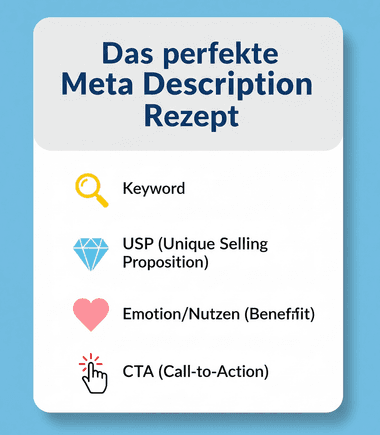
Every good meta description has four elements:
- Keyword: Google often bolds terms from the query, which draws the eye.
- Benefit or unique selling point: why your page? What exactly does the reader get?
- Call to action: what should the user do – read, compare, book, check?
- A reason to click: a question, a problem or a specific number that sparks curiosity.
Tip 3: Stand out, but stay credible
Special characters such as ticks, stars or arrows can catch attention. Don’t overdo it: a description full of symbols quickly looks spammy, and Google doesn’t display every character. My advice: stand out with a concrete benefit and a number rather than with symbols.
What do good meta description examples look like?
Theory is good; practice is better. Here’s how to apply the ingredients to different page types.
Example 1: Blog guide
- Keyword: balcony plant ideas
- Weak: “A blog post about planting balconies. Here are tips for planting balconies in spring, summer and autumn.”
- Better: “Balcony plant ideas for every season: 25 ideas from low-maintenance herbs to a flowering privacy screen. Find the right look for your balcony today.”
Why is it better? The keyword comes first, the benefit is concrete (25 ideas, every season), the examples spark curiosity and it ends with a clear call to action.
Example 2: Product page in an online shop
- Keyword: men’s barefoot shoes
- Weak: “Barefoot shoes for men in many sizes and colours. Leather upper, rubber sole. Low price. Buy online here now.”
- Better: “Men’s barefoot shoes, handmade in Portugal: flexible sole, room for your toes, a natural stride. Find your model and size today.”
Why is it better? Instead of dry specs, it sells the benefit. It names a clear USP (“handmade in Portugal”) and ends with a call to action that fits the next step. More on shop optimisation under ecommerce SEO.
Example 3: Homepage of a local business
- Keyword: hairdresser Hamburg Eimsbüttel
- Weak: “Welcome to Haarstudio Schnittpunkt in Hamburg Eimsbüttel. We offer haircuts for women and men. Drop by.”
- Better: “Your hairdresser in Hamburg-Eimsbüttel for modern cuts and colour. Relaxed atmosphere, Saturday appointments available. Book online now.”
Why is it better? It’s more personal, names the core services, promises a benefit and offers an easy next step. How local businesses get found on Google is covered under local SEO.
Example 4: B2B service page
- Keyword: industrial equipment maintenance
- Weak: “We are your competent partner for maintenance. Quality for many years. Contact us for further information.”
- Better: “Industrial equipment maintenance across northern Germany: fixed intervals, 24/7 emergency service, a test report after every visit. Request a maintenance plan.”
Why is it better? It replaces empty phrases like “competent partner” with facts a buyer can check. A purchasing manager sees at once what they’ll get.
An example from this page
The description of this article reads: “Meta description examples and tips: ideal length, four ingredients and before-and-after examples for blogs, shops and local businesses that earn clicks.” Keyword first, concrete content, clear benefit.
What if Google ignores your meta description?
Google often replaces the meta description with a passage from your page when that passage fits the query better. That’s normal. All you can do is make your description the best option for your most important queries.
If someone searches for a very specific detail that appears in your text but not in the description, Google will often show exactly that sentence. A 2020 study by the SEO software company Ahrefs found that Google rewrote the description in around 63 per cent of the cases studied. See it as a service to the user, not a criticism of your work.
What you can do:
- Answer the page’s main question: the description should fit the two or three most important queries the page is meant to rank for.
- Improve the page copy: a clear first paragraph that sums up the topic gives Google a good alternative if it does rewrite.
- Be patient: after a change it takes a while for Google to recrawl the page. In Search Console you can request indexing for a URL.
How do you test your meta description?
Never write blind. A SERP snippet preview shows you how your title and description will look in search results and whether the length works. Then measure the impact:
- Click-through rate in Search Console: the performance report shows impressions, clicks and CTR (the share of impressions that lead to a click) for every page. My call-to-action examples show how the right prompt earns you more clicks.
- Before-and-after comparison: change the description of a page with plenty of impressions and compare its CTR after four to six weeks with the period before – at a similar position.
- Think title and description together: they work as a unit. A strong description can’t rescue a meaningless title.
The meta description is part of on-page SEO, meaning everything you optimise on your own pages. How the pieces fit together is explained in what is SEO?.
Why is your meta description your salesperson in the search results?
Don’t treat the meta description as a chore. Treat it as what it is: free ad space on Google. It’s your first and often only chance to convince a searcher that your page answers their question. Ten minutes spent on a good description can pay off in extra clicks for years.
In my free SEO Compass you enter your address, answer a few short questions and within a few minutes you see whether your titles, descriptions and technical basics are in good shape – and where your biggest levers are. If you’d like to learn how all the parts of SEO work together, my SEO coaching is the natural next step. You’ll find more guides on the blog, and here’s my overall approach as an SEO consultant in Hamburg.