“Hamed, how do I find good keywords?” It’s a question I hear again and again – and rightly so: keywords are the foundation of any SEO work. Optimise for the wrong terms and you may get found, but by the wrong people. In this article I show you how to find good search terms using free Google sources and SEO keyword tools, and how to pick the right ones.
What is a keyword?
In SEO, a keyword is a search term: whatever people type into Google. Every keyword has its own search results page.
Every query typed into Google is a keyword, and for each one Google shows its own results page. Some terms are searched very often because lots of people are interested, like “holidays”. Others less so, like “chain-link fencing”. A keyword can be a single word or several, such as “buy a car online”. Because you can type anything into Google, the number of combinations is practically endless.
Two terms help you sort them:
- Short-head keywords are short, broad terms with high search volume and tough competition, such as “shoes”.
- Long-tail keywords are longer, more specific terms with lower volume but a clear intent, such as “waterproof women’s hiking boots for wide feet”.
Also crucial is search intent – what the searcher actually wants: to learn something, compare options or buy.
Why do keywords matter so much for SEO?
Why not just let Google decide which terms your website shows up for? Because most clicks go to the top results. When did you last look at page 2 of Google? Probably only when you were playing detective.
If you want SEO to work, you need to rank as high as possible for the right keywords. Only once you know which terms really matter can you optimise your pages for the right results pages. That’s where clicks, visitors and, ultimately, enquiries come from.
How do you find good SEO keywords?
The best keyword ideas come from six sources: Google Autocomplete, the suggestions on the results page, Google Search Console, Google Ads, your competitors and your customers.
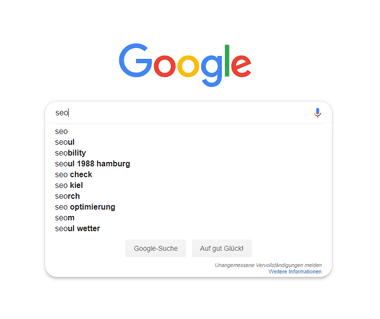
- Google Autocomplete: as you start typing, Google suggests common queries. It’s a quick way to see what people search for.
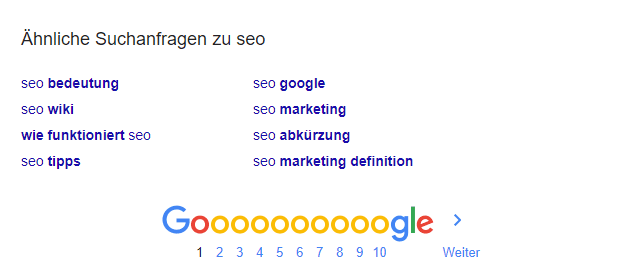
- Suggestions on the results page: the “People also ask” box and related searches at the bottom of the page reveal related terms and real questions.
- Google Search Console: the performance report shows which queries already bring your pages impressions and clicks. Terms in positions 5 to 20 are often the quickest wins.
- Google Ads: if you run ads, the search terms report shows which queries actually led to clicks and enquiries. More on my Google Ads page.
- Analyse competitors: which pages rank for your key terms, and which terms do your competitors rank for that you don’t?
- Ask your customers: which words do they use on the phone or in emails? They’re often different from your industry’s jargon.
Here’s what that looks like in practice: type “seo” and Google instantly suggests common completions. At the bottom of the results page you’ll find more related searches.
A note on Google Analytics: it used to show visitors’ search terms. Today, for privacy reasons, it shows hardly any keywords. Search Console is the better source.
Which SEO keyword tools can help?
Alongside Google’s own sources, specialist tools show search volume, competition and related terms.
| Tool | Best for | Cost |
|---|---|---|
| Google Trends | seasonality and trends, comparing several terms | free |
| Google Keyword Planner | search volume and keyword ideas straight from Google | free with a Google Ads account; ranges only without active ads |
| KWFinder | search volume, difficulty and filters for long-tail keywords | a few free searches, then subscription |
| Ubersuggest | keyword ideas, search volume, competitor analysis | a few free searches, then subscription |
| AnswerThePublic | questions around a term: who, how, what, why | a few free searches, then subscription |
| SEO suites such as Semrush, Ahrefs or SISTRIX | rankings, competitors, keyword gaps, visibility trends | subscription |
| AI assistants such as ChatGPT, Gemini or Claude | brainstorming, audience questions, grouping terms | basic version free |
My tip: use AI assistants for ideas, never for numbers. They don’t provide reliable search volumes. Check every idea with Keyword Planner, a keyword tool or your Search Console.
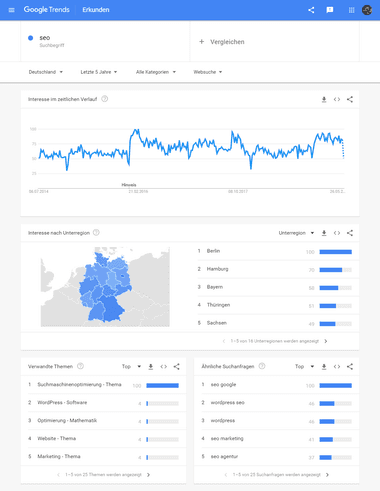
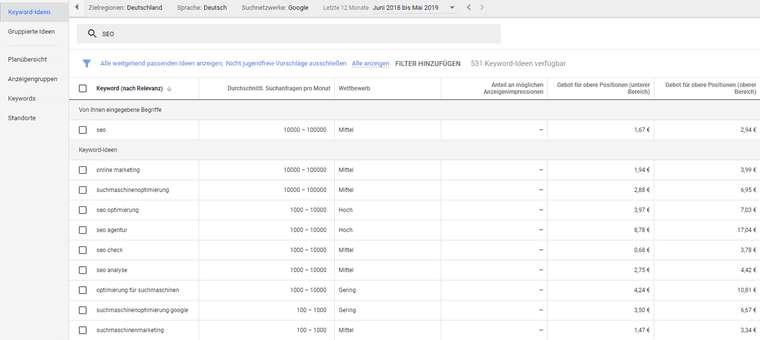
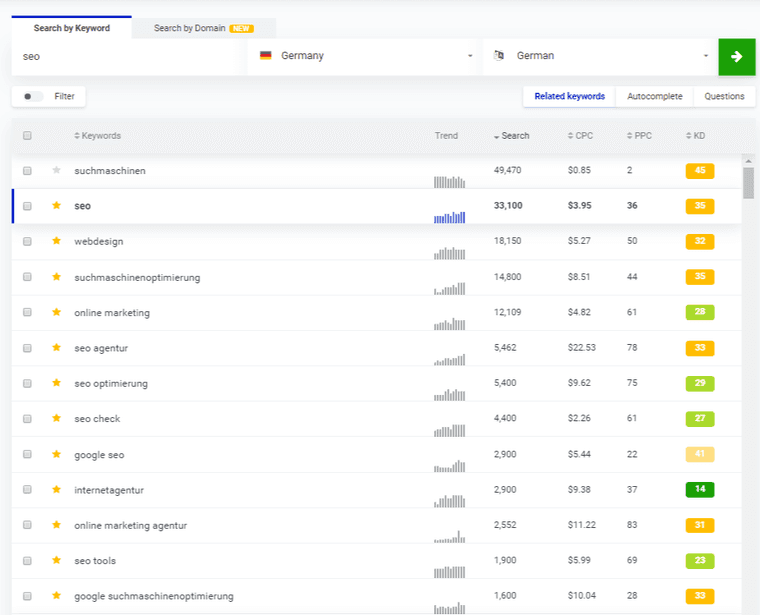
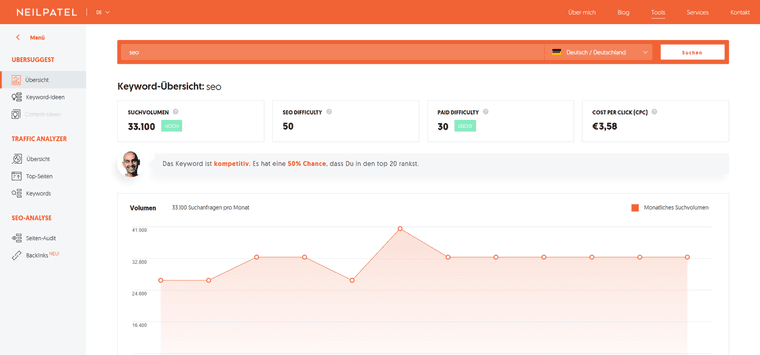
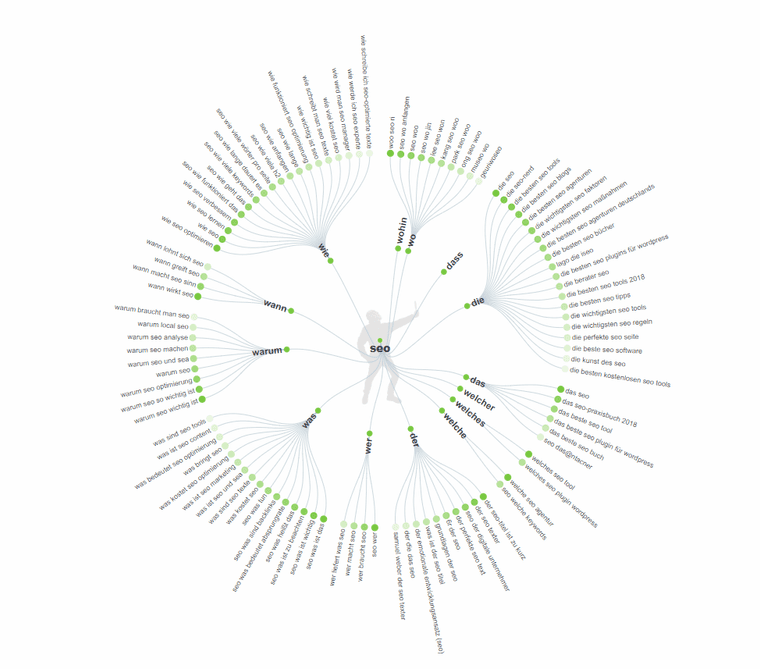
To show you what working with these tools looks like, here are screenshots from my own research on the term “seo” for the German market. They date from 2019. Some interfaces look different today, but the approach hasn’t changed.
Google Trends: when and where do people search?
Google Trends shows how interest in a term develops over time, which regions search for it most and which related topics and queries are popular right now. The “related queries” list in particular is a great source of keyword ideas.
Google Keyword Planner: search volume straight from Google
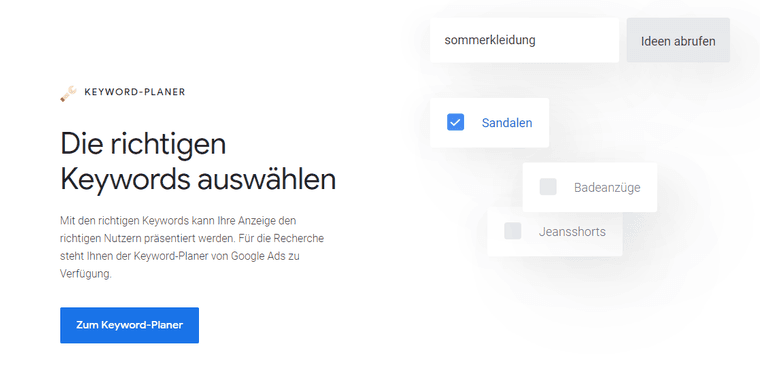
You’ll find Keyword Planner inside Google Ads. Enter a term and you get keyword ideas with average monthly searches, competition and cost per click. Without active ads, Google only shows search volume in ranges, such as “1K – 10K”.
KWFinder: finding long-tail keywords with filters
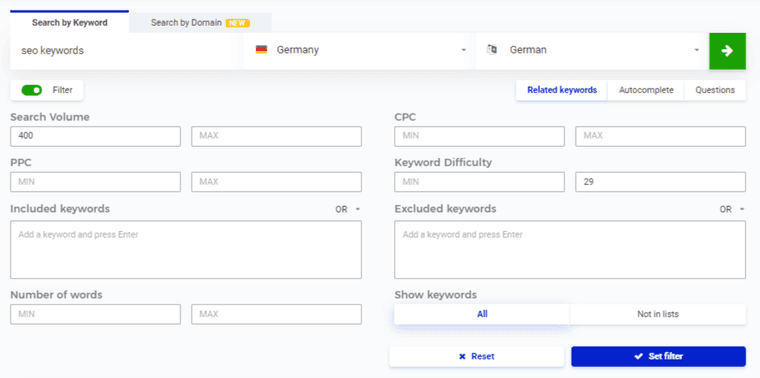
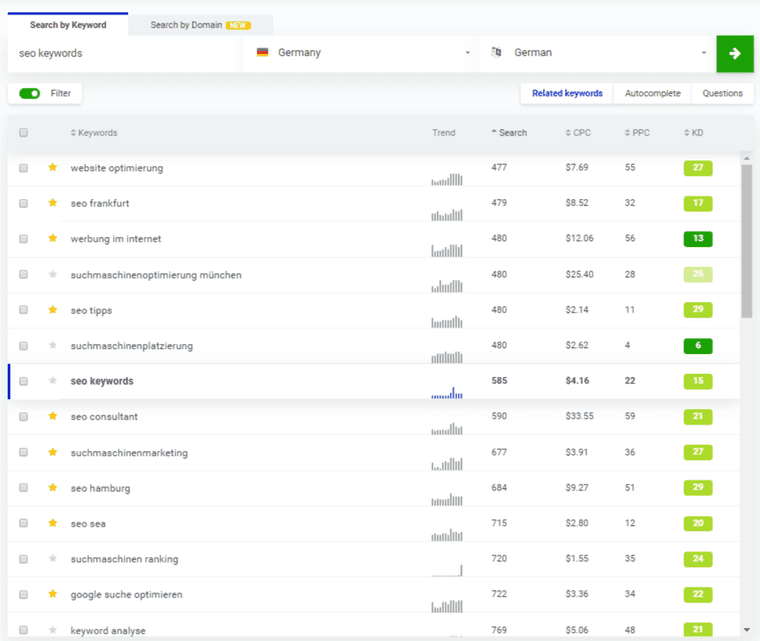
KWFinder gives you related keywords for a term with search volume, cost per click and a keyword difficulty (KD) score from 0 to 100. The filters are especially useful: set a minimum search volume and a maximum difficulty, for example, and you only see terms you have a realistic chance with.
Ubersuggest: search volume and difficulty at a glance
Ubersuggest shows you a term’s search volume, SEO difficulty, paid difficulty and cost per click, plus the trend over the last twelve months. From there, “keyword ideas” takes you to related terms.
AnswerThePublic: which questions does your audience ask?
AnswerThePublic collects questions around a term and groups them by question words such as how, what, why, when and which. They make great subheadings and FAQs – and they’re exactly the kind of questions people ask in AI search too.
How do you come up with keyword ideas in five minutes?
Over the years I’ve tried lots of methods. One idea I picked up at an SEO conference and developed further is based on a single question:
Which need puts your customer in a situation where the solution they look for is your offer?
It’s worth reading twice. It gives you four areas in which to collect keyword ideas. Start with the need: how do your customers describe what they actually want?
Using SEO as an example:
| Area | Example keywords |
|---|---|
| Need | increase sales, more visitors, new customers through online marketing, better rankings, more visibility |
| Situation | website not found, poor Google ranking, little SEO know-how in the team |
| Solution | SEO expert, SEO specialist, SEO agency |
| Offer | SEO consulting, SEO audit, SEO copywriting |
In a few minutes you’ll have a long list of good ideas – for your content marketing, for example. Then check them in a keyword tool for search volume and competition.
How do you choose the right keywords?
Choose keywords by four criteria: search intent, business value, search volume and competition. A term with low volume but clear buying intent is often worth more than a big, generic one.
- Search intent: does the intent match your page? Someone searching “what is SEO” wants to learn; someone searching “SEO agency Hamburg” wants to hire.
- Business value: how close is the term to an enquiry or a purchase?
- Search volume: is the term searched often enough to justify the effort?
- Competition: who ranks today? Against big portals and strong brands it’s tough; for niche providers with specific long-tail terms it’s often easier.
The art lies in estimating in advance which keywords will deliver which results. That’s why my team and I work with transparent ranking reports: for every keyword you see where you stand, how it’s developing and what it brings in visitors and enquiries.
How is AI search changing keyword research?
In ChatGPT, Gemini or Google’s AI Mode, people ask longer, more specific questions than in a classic search box. Instead of “women’s hiking boots”, they ask: “Which hiking boots are good for wide feet and long tours in the Alps?” For your research, that means:
- Plan topics, not single terms: one page should cover a topic with all its important sub-questions.
- Collect questions: the “People also ask” box, AnswerThePublic and your customer conversations surface the questions people also ask AI tools.
- Answer briefly, then go deeper: sections that open with a clear answer are more likely to be quoted by AI systems.
I explain how to optimise for AI search in GEO vs. SEO.
Why are good keywords the foundation of good rankings?
With free Google sources, a good SEO keyword tool and the need–situation–solution–offer question, you’ll quickly find the terms that fit your business. What matters is the selection: a few keywords with clear intent beat many that only bring traffic.
What happens after your research is covered in what is SEO? and my meta description examples. In my SEO Compass you enter your address, answer a few short questions and within a few minutes you see where your biggest levers are. If you’d like help with your keyword strategy, you’ll find all options under SEO solutions, and more guides on the blog.