WordPress expert in HamburgWebsites that run smoothly –and get found.
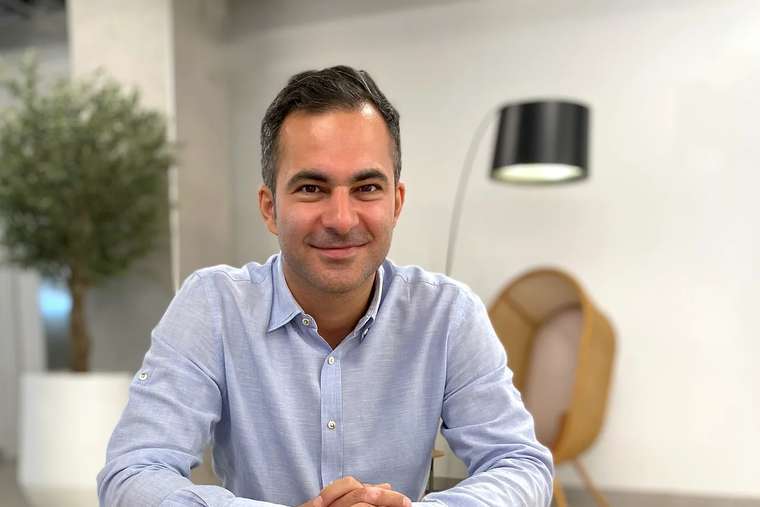
I’m Hamed Farhadian, a WordPress expert and SEO specialist based in Hamburg, Germany. I’ve worked with WordPress since 2006: I plan, develop and optimise WordPress websites and WooCommerce shops so they’re fast, secure and easy to find on Google. Delivery is handled with my team at SEOeffekt – from a single plugin to a complete relaunch.
Why do you need a WordPress expert?
Because a website that looks good doesn’t automatically bring customers. A WordPress expert makes sure your site is fast, secure and stable, and that Google finds it – today and after the next update.
You’re probably here for one of three reasons: you want a new WordPress website, you’re planning to relaunch your existing one, or your WordPress site is causing trouble – it’s slow, buggy or has slipped on Google.
In all three cases you need someone who knows WordPress inside out technically and also knows how a website climbs the rankings. That’s exactly the combination I offer: I build WordPress websites that don’t just look good and load fast, but often rank near the top on Google.

| What you need | What I do |
|---|---|
| New WordPress website | planning, theme, development and SEO from day one |
| Relaunch | redirect plan and testing, so your rankings survive |
| WordPress SEO | technical and content optimisation for Google and AI search |
| Custom functionality | custom plugin development or adapting existing plugins |
| Problems and maintenance | troubleshooting, speed, security, updates and backups |
Who is Hamed Farhadian?
I’ve been online since 1999 and have worked with WordPress since 2006. Since then I’ve spent countless nights getting to know WordPress and fixing WordPress problems. I went to as many WordPress meetups and WordCamps as I could, later travelled across Europe as a blogger and journalist, and gave talks at WordCamps myself.
One experience stands out: I had the chance to interview Matt Mullenweg, co-founder of WordPress. It showed me that the open-source idea behind WordPress – sharing knowledge and getting better together – is more than a slogan. You can read the interview with Matt Mullenweg here.
“Sharing is caring” is my attitude too. Whether at WordPress meetups in Hamburg or as a mentor at Hamburg University of Technology, I like to share what I know so others can succeed.
My enthusiasm for WordPress, SEO and online marketing turned into my own business in 2006. In 2019 I set up my agency SEOeffekt, where I now work with a team of eight. Over the years I’ve built many WordPress websites and online shops for small and large companies, and spent three years working on a WordPress project with more than a million visitors a month.
5.0 from 80+ Google reviews300+ clients since 19991,263 top-3 rankings
What should a professional WordPress expert be able to do?
A WordPress expert is a developer who understands WordPress down to the code while keeping an eye on speed, security, user journeys and search engines. Coding alone isn’t enough.
WordPress is open-source software. In theory, anyone with a bit of PHP and MySQL can build a website, a theme or a plugin. That makes it a great playground for students, junior developers and hobbyists – and at first glance their results often look good.
For your business, “looks good” isn’t enough. Most customers research online before they buy or get in touch. Your website isn’t just a digital business card; it largely decides your revenue. Whoever builds your new site or handles your relaunch carries real responsibility.
A WordPress expert should therefore:
- Understand WordPress at its core: core, themes, plugins, hooks, database and server – not just the dashboard.
- Write clean code: following WordPress standards, update-safe, never modifying core.
- Know the market: common themes, page builders and plugins, with their strengths, quirks and problems.
- Keep speed and security in view: every plugin and every script comes at a price.
- Think about SEO and conversions: a website should be found and generate enquiries.
A good WordPress developer speaks the dialect
Many general PHP developers add WordPress to their portfolio because WordPress runs on PHP and MySQL, so they speak the language in principle. But it’s like a Londoner trying to write in broad Glaswegian: another Londoner might buy it, a Glaswegian won’t.
It’s the same with WordPress. A non-specialist can adapt themes and plugins and put together an attractive site, and on the surface everything looks fine. Trouble starts deep inside a system made up of thousands of files – and with projects that need to scale: sites with many simultaneous users, cloud hosting or automated deployment (rolling out new versions to the server).
That’s exactly where problems appear, with load times for example. For Google, a slow page is a sign the result isn’t good enough; for your visitors, it’s a reason to leave immediately. My guide on why your WordPress site is slow explains the usual causes.
What happens when WordPress is built badly?
Poorly built WordPress sites often reveal their weaknesses only with the next update or the next new plugin:
| Consequence | Example |
|---|---|
| Bugs | overlapping sections, broken links |
| Crashes | the site no longer loads or shows only parts |
| Security holes | an open door for attackers |
| Display errors | the layout breaks on phones or tablets |
| Compatibility issues | problems in certain browsers |
| Missing or badly integrated features | invisible at first glance |
The last point is especially tricky because it hurts your rankings in the background – and with them your revenue. In the worst case your site drops out of Google and nobody can explain why. Google doesn’t mean any harm: its crawlers, the programs Google uses to read websites, simply notice that your site is faulty, and Google prefers to show its users one that works.
Why is WordPress so popular?
Anyone working with websites runs into WordPress. The recipe is simple: it’s easy to use, and content can be changed quickly without coding skills – everything runs from a clear dashboard. That’s what Matt Mullenweg and Mike Little set out to do in 2003 when they forked the blogging software b2/cafelog. Today, according to W3Techs, WordPress is the most widely used content management system in the world.
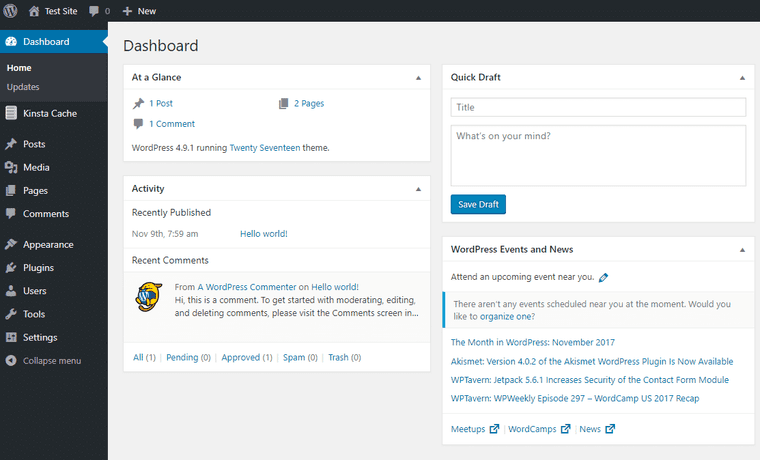
The block editor (Gutenberg, introduced in 2018) and block themes have changed WordPress a lot: many layouts that once required heavy page builders can now be built directly in the editor. That makes websites leaner and faster – if it’s done right.
You don’t have to be a WordPress expert to like WordPress. But it helps to see the system through Google’s eyes. My guide on whether WordPress is the best CMS for SEO goes into detail.
WordPress or a static website: which suits you?
My own website, hamed.de, no longer runs on WordPress but on Astro. For most businesses, WordPress is still the right choice.
To be honest: after many years I moved hamed.de from WordPress to Astro. Astro is a framework that generates finished HTML pages, which the server delivers without a database or plugins. That suits this site: I’m almost the only author, there’s a lot of text and few features, and I build the site with AI. I show how it went in my lab.
That’s not a verdict against WordPress. The question is always what fits your business:
| Situation | My recommendation |
|---|---|
| Several people edit content without technical skills | WordPress |
| Shop with WooCommerce, bookings, members’ area, forms | WordPress |
| Plugins needed for multilingual content, newsletters or CRM | WordPress |
| Few pages, one author, developer or AI on the team | a static site can work |
| Top priority on speed, with updates handled by developers | a static site can work |
A well-built WordPress site can be very fast and rank very well. What matters isn’t the system but how cleanly it’s implemented. If switching makes sense for you, I’ll tell you – and if it doesn’t, I’ll tell you that too.
Which WordPress services do I offer?
The WordPress world covers a wide range of services, from consulting and planning to delivery. This is what my team and I take on:
New WordPress website or relaunch
From planning and choosing the right theme to the finished website – with SEO built in from the start. For a relaunch I pay particular attention to:
- Google’s current requirements, such as Core Web Vitals and mobile usability,
- the right keywords for your target audience,
- clean indexing, so Google can find and read every important page,
- a complete redirect plan, so rankings survive the move.
Nobody can guarantee that a relaunch won’t cost a single position. But with careful planning the risk stays small. My guide to a website relaunch without losing rankings explains how.
Custom plugin development
If you need a feature that doesn’t exist yet, I develop a custom plugin. Often that isn’t even necessary: for almost every task there’s a good plugin that can be adapted. Knowing the market saves you the time and money of building from scratch.
Forms in WordPress
Contact forms, enquiry forms, multi-step questionnaires or forms with calculations: with plugins such as Gravity Forms almost any form can be built in WordPress and connected to your CRM, newsletter or payment provider. What matters is that they’re easy to fill in – every unnecessary field costs enquiries. My page on conversion rate optimisation shows how to get more leads from your visitors.
WooCommerce online shops
Online shopping is as much part of everyday life as smartphones and streaming. WooCommerce is the most widely used shop plugin for WordPress and has clear advantages:
- Free and open source: you only pay for the extensions you actually need.
- Fully customisable: WordPress and WooCommerce let you build a shop that fits your requirements exactly.
- Large ecosystem: plenty of themes, extensions and developers who know it well.
For the German market, WooCommerce needs add-ons for price display, tax and legal texts, such as Germanized or German Market. Convenient as WooCommerce is, setting it up takes technical know-how. How your shop then climbs the rankings is covered on my page about e-commerce SEO.
Hosting and migration
Adapting themes and plugins or moving whole websites to a new host is part of the job too. For WordPress hosting I work with HostPress, a host specialising in WordPress that is also one of our clients. My guide to fast WordPress hosting explains what matters.
Maintenance
A maintenance plan keeps your website running reliably, with someone on hand straight away if problems arise. It covers:
- updates to WordPress, themes and plugins – tested, because even stable updates occasionally cause trouble,
- regular backups, so the site can be restored in an emergency,
- small design and content changes on request, so you don’t have to brief someone new for every detail.
I support businesses in person in Hamburg and remotely across Germany, Austria and Switzerland.
How do you get WordPress SEO right?
WordPress SEO is search engine optimisation for a WordPress website: the technical set-up, content and structure are set up so that Google and AI search understand the site and show it for the right terms.
This is often where panic sets in: you’ve added the right keywords – so why aren’t you being found? Are expensive Google Ads the answer? No. Ads bring visitors only as long as you pay. The smarter move is to optimise your WordPress site technically and in terms of content.
How did you find this page? Probably through Google, with a search like “WordPress expert Hamburg”, “WordPress developer” or “WordPress freelancer”. That’s SEO at work.
| Area | What it includes |
|---|---|
| Technical SEO | load time, clean indexing, no duplicate content, structured data |
| Content | copy that answers your customers’ questions better than the competition |
| Structure | clear navigation, readable URLs, sensible internal links |
| AI search | quotable answers and full content in the HTML |
The technical set-up is the foundation; whether you rank is then mostly down to your content. My step-by-step WordPress SEO guide goes into detail. How SEO works as a whole is explained on my page as an SEO consultant in Hamburg.
How do I work with you as a WordPress expert?
Would you build a house on sand? Probably not. A house is a big investment, so you hand it to a builder with plenty of experience. And if you caught the bricklayer putting up a wall before the foundations were poured, you’d find another builder.
Your website is similar: it’s one of your most important tools for winning customers. A really good WordPress developer is architect, site manager and interior designer in one. Here’s how I work:
Step 1: Analyse
For a relaunch or a technical SEO project I examine your existing website closely. I look for problems and their causes and find a fix quickly, because every day your site doesn’t work properly costs you customers. That includes knowing the common themes, page builders and plugins with all their quirks – from Gravity Forms to WPBakery, from Avada to the block editor.
A new website starts with analysis too: what do your visitors expect, which features do they need, and how can that be built? Every industry has its specifics, so I first put myself in the shoes of your business and your audience.
Step 2: Plan
The goal is the same for every business: visitors should do what you want them to do – buy, enquire, book a call or sign up for the newsletter. That desired action is called a conversion.
A good brief is half the battle. The more I know about your business and your customers, the better the result. From that we build a roadmap for your project. Larger tasks are shared across a team of specialists; smaller ones can be handled by one person. Your budget plays a part, of course.
Step 3: Build
For a new website we choose a suitable theme together. I adapt an existing theme to your needs or develop a custom one. Same with plugins: where a good one exists, we use it; where it doesn’t, we build the feature ourselves.
Every decision is guided by a logical user journey: visitors should find their way immediately and follow the path that leads to an enquiry or a purchase. And the technical build already has to anticipate the content to come. If you know you want a dining table for ten in the kitchen, you plan the room accordingly.
Step 4: Content and SEO
Once the shell is built, it’s time to furnish it: the content. You can furnish your home however you like. Your website, on the other hand, has to generate revenue, and your competitors want the same customers. The judge in this contest is Google – using hundreds of signals it doesn’t disclose. There are clear guidelines and proven experience, though, and that’s what SEO is for.
WordPress freelancer or WordPress agency?
For small to medium-sized websites, WordPress is ideal. You can do a lot yourself and quickly put an attractive site in front of your customers. For it to bring customers, though, it has to meet technical requirements that matter especially to Google. That’s where it pays to have a WordPress specialist take a look.
I know not every budget stretches to an agency. That’s why there are several ways to work with me:
- Like a freelancer: one contact for a manageable project, which keeps communication simple.
- As an agency: for larger projects my team at SEOeffekt delivers – development, design, copy and SEO.
- As coaching or a workshop: you or your team learn to maintain your WordPress site and optimise it for Google yourselves. More in SEO coaching and my talks and workshops.
- As long-term support: maintenance, further development and ongoing SEO, all in one place.
Which route suits you is best worked out in a conversation. The intro call is free and without obligation.
“Thanks to his experience and technical skills, we were able to optimise our processes and measurably increase our conversion rate.”
Significant revenue growth and better measurability
“WordPress pro and, for me, a true online marketing authority! Hamed has earned every one of the five stars! We met through a mutual friend, and at first I was very sceptical. Luckily, I gave it a chance. Since then we’ve had a call every week focusing on website optimisation, SEO, Google AdWords and Facebook marketing. The result: a significant increase in revenue, greater reach online and better measurability of our successes. What stands out about working together is the very friendly and competent explanations and advice, plus recommendations for useful WordPress tools. Keep it up, Hamed!”
Support all the way to the premier discipline: SEO
“I have to say, I haven’t met such a likeable and unconditionally helpful team in a long time. […] The people around their charismatic boss Hamed Farhadian supported me in building my website from day one. In an uncomplicated way, they expertly guided me from registering the domain and installing WordPress to creating the first content and setting up my online shop – all the way to the premier discipline: SEO. […]”
 Daniel JöhnkFounder, Brainfood
An eye for my particular niche
“Hamed helped me with lots of things around my website. He really knows his stuff when it comes to SEO and can explain everything in a very easy-to-understand way. He’s also quick to help with WordPress questions and always has an open ear! What I liked most was his feel for my subject and my particular audience. I’m very glad I found him!”
 Philipp PäglerTV presenter, P-Moderation
Solved my problem in no time
“Hamed is extremely fast and solved my problem in no time. I can only recommend him!!!”
Translated from German.
Questions for a WordPress expert
Updated on · by Hamed Farhadian
What makes someone a WordPress expert?
A WordPress expert knows WordPress beyond the dashboard, right down to the code: core, themes, plugins, database and server. They spot the source of problems quickly, can adapt or build themes and plugins cleanly, and know which decisions will later affect speed, security and rankings.
How much does a WordPress developer cost?
It depends on the scope: a small tweak is very different from a custom plugin or a full relaunch. Experienced developers often charge more per hour but need far less time, because they recognise problems straight away. After a short call you get a clear proposal from me.
Can a WordPress expert set up WooCommerce?
Yes. WooCommerce is the most widely used shop plugin for WordPress, and a WordPress expert should handle it confidently – including payments, shipping, tax and the adjustments a shop in Germany needs for price display and legal texts. How to get your shop ranking is covered on my page about e-commerce SEO.
How much does WordPress maintenance cost per month?
That varies a lot with size and scope. A large site with many plugins and pages needs more care than a small one. What matters is what’s included: updates, backups, security checks and whether small change requests are covered.
Does a WordPress expert also do SEO?
Not always. Many WordPress developers know the SEO basics but focus on the technical side. With me you get both: since 2013 my German page has ranked on page 1 of Google for “SEO-Experte Hamburg”, often in first place. More on my page as an SEO consultant in Hamburg.
Is WordPress still a good choice today?
Yes, for a great many businesses. WordPress is the most widely used content management system in the world, with a huge choice of plugins and developers. Even so, I moved my own site, hamed.de, to Astro – why, and when WordPress remains the better choice, is explained above in the section WordPress or a static website.