What is Google PageSpeed Insights?
Google PageSpeed Insights is a free analysis tool from Google at pagespeed.web.dev. Enter a URL and you get a rating for mobile and desktop with concrete suggestions for improvement.
The report has two parts that people often mix up:
- Field data (top): how fast your page was for real Chrome users over the last 28 days. This comes from the Chrome User Experience Report and is what Google uses to assess page experience. Small sites with little traffic often don’t have field data yet.
- Lab data (below): a simulated test run with Lighthouse. This produces the familiar 0–100 score, plus diagnostics showing what slows the page down.
So the score is a debugging tool, not a number Google uses directly for rankings.
Is page speed a ranking factor?
Yes, but not in the way many people think. Google has confirmed that loading speed feeds into its assessment – since 2021 mainly through the Core Web Vitals as part of “page experience”. At the same time, Google is clear that relevance and content quality come first.
The bigger reason to have a fast site is your visitors. If they wait too long, they leave before they ever see your offer. A fast site improves the user experience, keeps visitors around longer and brings more enquiries and sales – and that ends up helping your rankings too.
Which Core Web Vitals matter in 2026?
Core Web Vitals are three metrics Google uses to measure the experience of loading and using a page. Since March 2024, INP has been part of the set, replacing the older FID metric.
| Metric | What it measures | Good | Poor |
|---|---|---|---|
| LCP (Largest Contentful Paint) | When the largest visible element has loaded, usually the hero image or headline | up to 2.5 s | over 4 s |
| INP (Interaction to Next Paint) | How quickly the page responds to clicks and input | up to 200 ms | over 500 ms |
| CLS (Cumulative Layout Shift) | How much content jumps around while loading | up to 0.1 | over 0.25 |
Google looks at the 75th percentile: three out of four page views have to meet the threshold. The “Core Web Vitals” report in Google Search Console gives you the overview for your whole site.
How did I take a score from 24 to 92?
On one client website, the mobile PageSpeed score was 24 out of 100 in 2021. After targeted optimisation it reached 92. Jumps like that aren’t luck: a site is almost always held back by a few big things, and once you find them, the score climbs sharply.
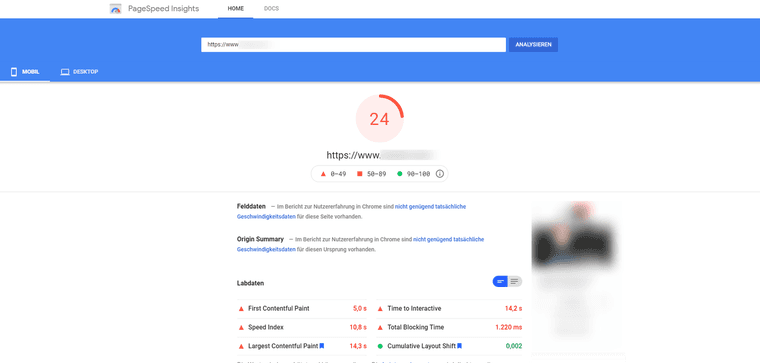
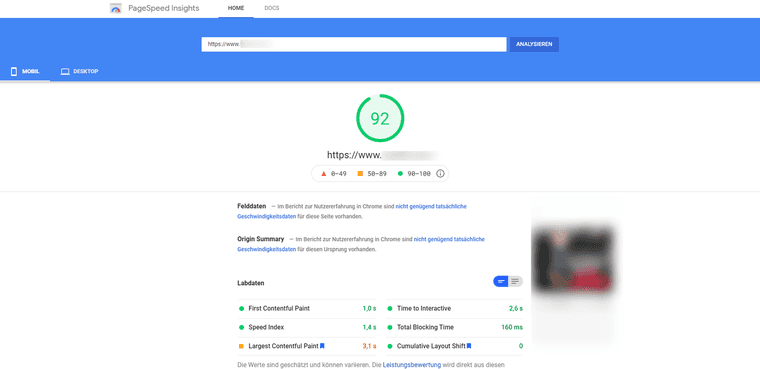
In detail: the first visible content (First Contentful Paint) appeared after 1.0 seconds instead of 5.0, the largest element (Largest Contentful Paint) after 3.1 seconds instead of 14.3, and the time blocked by scripts (Total Blocking Time) dropped from 1,220 to 160 milliseconds. Lighthouse has since changed which metrics make up the score and how they’re weighted, so a score from 2021 isn’t directly comparable with one measured today.
The levers I start with in projects like this are nearly always the same. You’ll find them in the next section.
Which fixes make the biggest difference?
1. Optimise and compress images
Images are often the largest files on a site and frequently determine LCP.
- Modern formats: AVIF or WebP instead of JPEG and PNG save a lot of file size at the same quality.
- Right size: don’t serve images larger than they’re displayed. With
srcset, every device gets a suitable version. - Set width and height: the browser reserves the space and nothing shifts (good for CLS).
- Lazy loading: load images further down only when the visitor scrolls to them – but never the hero image at the top, or LCP gets worse.
- Tools: Squoosh, TinyPNG or ImageOptim shrink images without visible quality loss. Many platforms now do this automatically.
2. Caching and server
Caching means storing files once they’ve been generated or downloaded, so they don’t have to be produced again every time.
- Browser caching: with the right
Cache-Controlheaders, the browser stores images, CSS and JavaScript, and returning visitors load the page much faster. On Apache servers you set this in.htaccess; many hosts and CDNs offer it as a setting. - Page caching: store finished HTML pages instead of rebuilding them on every request.
- CDN: a content delivery network serves files from a server close to the visitor.
- A fast server: if the server’s first response (time to first byte) is already slow, front-end optimisation can only do so much.
3. Reduce JavaScript and CSS
Too much or poorly loaded JavaScript slows loading and makes the page sluggish when people click (bad for INP).
- Remove what you don’t need: unused plugins, sliders, widgets and old tracking code.
- Minify: strip whitespace and comments. Build tools or caching plugins usually handle this today (for example with Terser and cssnano).
- Load later: scripts that aren’t needed right away can use
deferor load on interaction. - Audit third parties: chat widgets, embedded videos, maps and ad pixels often cost the most time.
4. Keep fonts lean
Web fonts are often underestimated. One or two WOFF2 files, self-hosted and loaded with font-display: swap, are almost always enough.
In what order should you work?
- Check field data: in PageSpeed Insights or the Core Web Vitals report in Search Console, see which metric is red or amber.
- Test your key page types: homepage, service pages, blog posts, product pages – on mobile.
- Find the bottleneck: the report shows which element is the LCP and which scripts block rendering.
- Biggest levers first: usually the hero image, caching and third-party scripts.
- Re-test: lab data immediately, field data after about four weeks.
If your site runs on WordPress, you’ll find the usual culprits in my guide Speed up WordPress.
How fast is fast enough?
A good target: all three Core Web Vitals in the green and a mobile score above 90. For the relaunch of hamed.de I set myself stricter goals: LCP no more than 1.5 seconds, INP no more than 100 milliseconds, CLS no more than 0.05 and a Lighthouse score of 100 on every page type. I describe how we approached it in my article on website relaunches.
Not sure where to start? In the SEO Compass you enter your address, answer a few short questions and within a few minutes you see where your website stands on Google and in AI search, and where your biggest levers are.
If you’d like help with implementation, send me a message using the form below. You can read more about how I work as an SEO consultant in Hamburg.