Is WordPress SEO-friendly out of the box?
Partly. WordPress now ships with many SEO basics, but it has no per-page fields for title tags and meta descriptions. For that, you need an SEO plugin.
Many companies running WordPress ask me for technical help. Most of the time it’s about what I’ve specialised in for many years: search engine optimisation for WordPress websites.
What WordPress already does well:
- Readable URLs: with the “Post name” permalink setting, every page gets a clean address.
- XML sitemap: since version 5.5, WordPress generates a sitemap for search engines automatically.
- Lazy loading and modern image formats: images load as you scroll, and WebP and AVIF are supported.
- Proper headings: the block editor uses real H1 to H6 headings.
What’s missing: per-page title and description fields, control over structured data, canonical tags and redirects. An SEO plugin fills that gap.
Which SEO plugin do you need for WordPress?
Search for a WordPress SEO plugin and you’ll quickly land on Yoast SEO. It has been widely used for years and adds the key SEO features. By now there are several equally capable alternatives:
| Plugin | Strengths |
|---|---|
| Yoast SEO | very widespread, lots of tutorials, snippet preview and readability analysis |
| Rank Math | many features in the free version, such as redirects |
| SEOPress | lean, tidy interface |
| The SEO Framework | very lightweight, hardly any settings needed |
All four give you per-page title tags and descriptions, a sitemap, canonical tags and structured data. Pick one and stick with it.
Why SEO is more than a plugin
A plugin is a tool. It gets WordPress ready for SEO, but it won’t put you in first place or send you enquiries by itself. One thing matters a lot to me: SEO isn’t a checkbox in the settings. It’s the combination of technical know-how, language and knowing your audience.
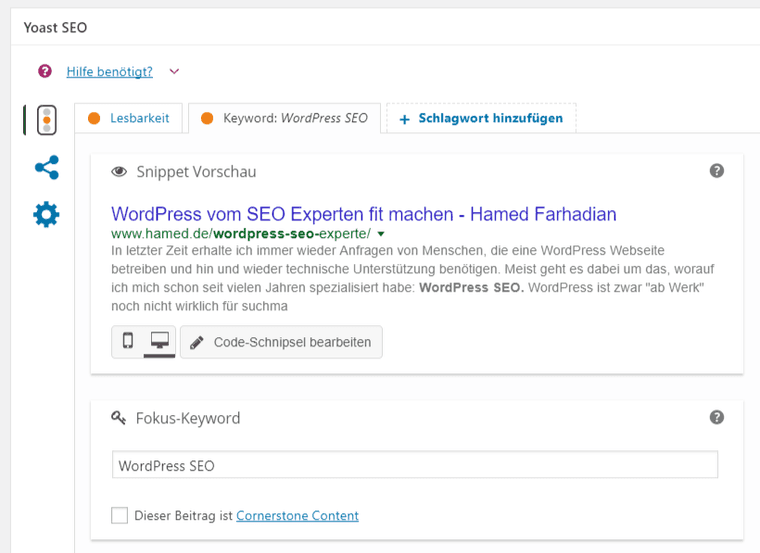
An example: the plugin shows you a preview of how your post would look in Google’s results – the snippet. When I wrote the original version of this article, my focus keyword was the German “WordPress SEO” and my secondary keyword “WordPress SEO Experte” (WordPress SEO expert), because I know that’s how potential clients search. But what exactly goes into the fields? No plugin can answer that for you.
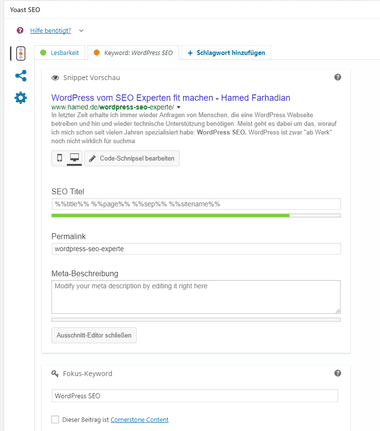
Only when you click the preview do the fields for SEO title, permalink and meta description open up:
What goes into the title tag and meta description?
The title tag is the blue, clickable headline in a Google result. The meta description is the short text below it. Both influence whether someone clicks on your result.
| Title tag | Meta description | |
|---|---|---|
| Ranking influence | an important signal for the page’s topic | not a direct ranking factor |
| Click influence | high | high – it’s your ad copy |
| Length | about 50–60 characters | about 120–155 characters |
| Content | main keyword near the front, clear benefit, brand at the end | benefit, what’s on the page, a reason to click |
Writing good titles and descriptions takes experience. I’ve written more than 2,000 of them and know how Google handles them. My advice: invest real effort in the wording. Write for people who have a question right now, not for a machine. You’ll find templates in my article with meta description examples.
Title tags and descriptions are an important part of WordPress SEO, but only one of many. Google evaluates hundreds of signals.
What decides your rankings beyond the plugin?
- Keywords and search intent: which terms should each page rank for, and what does the searcher expect to find?
- Content: does the page answer the question better than the other results? Is it up to date?
- Structure: exactly one H1 per page, meaningful subheadings, one page per topic.
- Internal links: important pages are linked from other pages on your site.
- Page speed: fast pages rank and convert better – see Speed up WordPress.
- Maintenance: keep WordPress, your theme and plugins updated, use HTTPS and run a current PHP version. As of October 2026, WordPress recommends PHP 8.3 or higher.
- Thin archive pages: set tag, author and attachment pages without their own content to noindex, so Google focuses on your important pages.
- Images: descriptive file names and alt text that says what’s in the picture.
- AI search: clear answers at the start of each section help ChatGPT, Gemini and Google AI Overviews quote your page.
How do you set up WordPress for SEO, step by step?
- Check visibility: under “Settings → Reading”, “Discourage search engines from indexing this site” must be unchecked.
- Set permalinks: under “Settings → Permalinks”, choose “Post name”. On an existing site, plan redirects first.
- Install one SEO plugin and run through its setup wizard.
- Connect Google Search Console and submit your sitemap.
- Write a title tag and meta description for every important page.
- Set archive pages without added value to noindex.
- Improve speed: caching, images, a lean theme and good WordPress hosting.
- Add internal links: from related posts to your most important pages.
What does a WordPress SEO expert do?
A WordPress SEO expert brings two worlds together: technical understanding of WordPress and a feel for language and search intent. Plenty of people call themselves SEO experts or can write search-optimised copy. Fewer also have the technical instinct and hands-on experience with WordPress itself – themes, plugins, hosting and speed.
Here’s what that looks like in practice and how I work as a WordPress expert in Hamburg. If you have a WordPress site you’d like an SEO expert to optimise, send me a message using the form below. You can also read more about my work as an SEO consultant in Hamburg.